
Download EduWriter – AI Text & Writing Subscription App
Overview
EduWriter is a modern, subscription‑based web application designed to help students, teachers, and content creators generate high‑quality written material using artificial intelligence. Launched on Softonic on May 31st, 2025, this AI‑driven writing tool lives entirely in the browser, meaning there is no need for a heavyweight desktop client or complex installation procedures. Users access EduWriter through any modern browser – Internet Explorer, Firefox, Opera, Safari, or Chrome – and enjoy a responsive interface that adapts to both desktop and tablet screens.
The platform offers a suite of writing assistants, from grammar checking and style suggestions to topic brainstorming and full‑article generation. While the service is subscription‑only, a free trial period allows new users to explore core capabilities before committing to a monthly or annual plan. EduWriter positions itself as a “one‑stop shop” for academic essays, lesson plans, marketing copy, and even creative storytelling, promising to cut research time, improve language precision, and boost overall productivity.
Its cloud‑based architecture ensures that all work is automatically saved and synchronized across devices, while robust security protocols protect user data with end‑to‑end encryption. Whether you are drafting a research paper, preparing classroom materials, or polishing a blog post, EduWriter aims to be the reliable AI companion that keeps your writing flow smooth and error‑free.
Key Features
- AI‑Generated Drafts – Instantly create outlines, introductions, or full articles based on a few keywords.
- Real‑Time Grammar & Style Checker – Context‑aware suggestions for punctuation, tone, and readability.
- Citation Builder – Automatic formatting for MLA, APA, Chicago, and Harvard styles.
- Plagiarism Detector – Integrated similarity checker that scans content against billions of web pages.
- Custom Templates – Pre‑made structures for essays, lesson plans, newsletters, and social media posts.
- Collaborative Workspace – Share documents with classmates or coworkers for live editing.
- Multilingual Support – Generate and edit text in more than 20 languages with native‑level accuracy.
- Secure Cloud Storage – All files are saved to an encrypted server, accessible from any browser.
- Regular Updates – New AI models and feature enhancements rolled out monthly.
- Flexible Subscription – Monthly, quarterly, or annual plans with a 14‑day free trial.
Installation, Usage & Compatibility
Because EduWriter is a pure web application, there is no traditional installation process. To get started, simply navigate to the official EduWriter website, click the “Start Free Trial” button, and create an account using an email address or a social‑media login. After confirming your email, you will be directed to the dashboard where the full editor loads instantly in the browser.
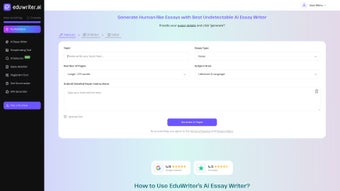
The interface is divided into three panels: a left‑hand navigation bar, a central writing canvas, and a right‑hand sidebar for AI suggestions and citation tools. Users can begin a new document by selecting a template or by entering a prompt for the AI generator. As you type, the real‑time grammar engine highlights errors and offers improvements, which you can accept with a single click.
When the draft is complete, the citation builder helps you insert properly formatted references, and the plagiarism scanner verifies originality before export.
EduWriter is compatible with all major operating systems because it runs in any modern browser. The supported browsers include Internet Explorer (latest version), Firefox, Opera, Safari, and Chrome, making it accessible on Windows, macOS, Linux, and even Chrome OS devices. Mobile browsers on iOS and Android are also supported, although the full feature set is best experienced on a desktop or tablet with a larger screen. The application automatically detects your browser language settings and adapts the UI accordingly, ensuring a seamless experience across regions.
Pros, Cons & Frequently Asked Questions
Pros
- Works on any device with a modern browser – no downloads required.
- Comprehensive AI writing suite that covers drafting, editing, and citation.
- Strong security with encrypted cloud storage and GDPR compliance.
- Regular feature updates keep the tool ahead of competing AI writers.
- Collaboration tools simplify group projects and peer review.
Cons
- Subscription‑only model may deter occasional users.
- Requires a stable internet connection; offline work is not supported.
- Advanced features (e.g., plagiarism detection) are limited to higher‑tier plans.
- Interface can feel dense for beginners unfamiliar with AI writing concepts.
- Internet Explorer support is limited to the most recent version only.
Frequently Asked Questions
Is EduWriter compatible with mobile browsers?
Yes, EduWriter runs on mobile browsers for iOS and Android, but the full set of editing tools is optimized for desktop or tablet screens. The responsive design adjusts the layout, though some advanced features (like the side‑by‑side citation panel) are best used on larger devices.Can I export my documents to Microsoft Word or PDF?
Absolutely. After finishing a document, you can download it as a .docx file for Microsoft Word, a .pdf for universal viewing, or even as plain .txt. The export retains all formatting, citations, and AI suggestions that you have accepted.How does the free trial work?
The free trial lasts 14 days and provides unrestricted access to all core features, including AI drafting, grammar checking, and citation building. Premium tools like plagiarism detection are available only during the trial if you upgrade to a paid plan before the trial ends.Is my data safe on EduWriter’s cloud?
EduWriter follows industry‑standard security measures, including SSL/TLS encryption for data in transit and AES‑256 encryption for data at rest. The platform is also GDPR‑compliant, ensuring that personal information is handled with strict privacy controls.What subscription plans are available?
EduWriter offers three main plans: a monthly plan, a discounted quarterly plan, and an annual plan that provides the best value. All plans include the core AI writing suite; higher‑tier plans add plagiarism detection, priority support, and larger cloud storage quotas.Conclusion
EduWriter stands out as a versatile, browser‑based AI writing companion that caters to both academic and professional needs. Its blend of real‑time editing, citation management, and multilingual generation makes it a strong contender in the crowded AI‑text market. While the subscription model may not suit occasional writers, the generous free trial and frequent feature updates provide ample opportunity to assess its value before committing. If you’re looking for a secure, constantly evolving tool that works across Windows, macOS, Linux, and any modern browser, EduWriter is worth a try. Click the button below to start your free trial and experience AI‑enhanced writing today.



.png)



